By MISSIRIA 9 min read
In this article
- What job does the site need to do now?
- Is the problem in the content, the design or the foundation?
- Is your content original, or a copy of what already exists?
- Can the current theme and plugins be maintained?
- What would a rebuild put at risk?
- Who will edit the site afterwards, and how?
- What does each option cost over the life of the site?
- A quick way to decide
- Where MISSIRIA fits
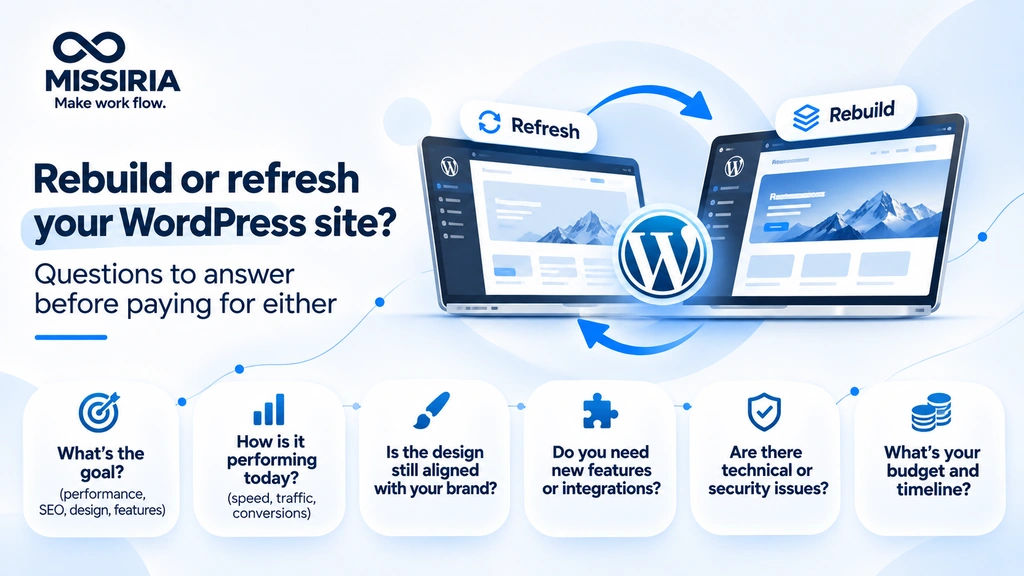
Refresh a WordPress site when its foundation is sound and the problems are in content, design or structure; rebuild when the theme, plugins or custom code can no longer be maintained safely, or when the site has to do a job it was never built for. You can usually tell which one you need by answering a short set of questions before you ask anyone for a quote.
The questions below are the ones worth settling first, because the answers change what you should be paying for.
What job does the site need to do now?
Start with the job, not the look: a website is worth changing when it no longer does what the business needs, such as explaining the offer clearly, taking enquiries or bookings, or saving your team a manual step. Write that job down in a few sentences before anything else.
Useful questions to answer in writing:
- Who visits the site, and what should they be able to do on it?
- What has changed in the business since the site was built: new services, new markets, new languages, a new booking or payment process?
- What does the team currently do by hand because the site cannot do it?
- Which pages bring in enquiries or sales today, and which ones nobody uses?
If the job has not changed and the site still does it, you probably need a refresh. If the job has changed a lot, such as adding customer accounts or a booking flow, a rebuild becomes more likely.
Is the problem in the content, the design or the foundation?
Most complaints about a website fall into one of three layers, and only problems in the foundation usually justify a rebuild. Content problems are about what the pages say. Design problems are about how pages look and how people move through them. Foundation problems are about the theme, plugins, hosting and code underneath.
- Content: out-of-date service descriptions, thin pages, text copied from other sites or repeated across your own pages, unclear calls to action. These are fixed by planning and writing original content, on the current site.
- Design and structure: a dated look, confusing navigation, pages that are hard to use on a phone. These can often be fixed by updating templates, menus and page layouts without replacing the whole site.
- Foundation: a theme that is no longer updated, plugins that conflict, custom code nobody understands, or a site that breaks on every update. These are the problems a refresh cannot cover up.
Be honest about which layer you are describing. A site that “looks old” is a design problem, and a full rebuild is an expensive way to fix it.
Is your content original, or a copy of what already exists?
A new design will not help a site whose pages say the same thing as everyone else’s. Before you pay for a refresh or a rebuild, check whether your content is really your own. In our view this now matters more than the theme or the page builder: search engines and AI assistants already have plenty of generic answers, and they look for pages that add something new.
Duplicate content usually comes from one of three places:
- Copied text: service descriptions taken from a competitor, a supplier or a manufacturer, with a few words changed.
- The same page many times: city or service pages where only the place or product name changes.
- AI text without a plan: articles produced by asking an AI tool to “write about X”, with no brief, no facts from your business and nobody checking the result. The output repeats what is already published, because that is what the tool learned from.
A page is not penalised just because similar text exists elsewhere, but it rarely helps either. When several pages say the same thing, search engines usually show only one of them, and it is often not yours. Producing pages in bulk mainly to rank, by hand or with AI, is against Google’s spam policies on scaled content.
Plan the content before anyone writes
Original content starts with a plan, not with a prompt. For each page, write down:
- The question it answers: one main question per page, in the words your customers use. Two pages should not answer the same question.
- What only you can say: how you actually do the work, the steps, the prices you publish, the mistakes you see customers make, the questions you are asked every week, photos of your own work.
- The new idea: what this page adds that the pages already ranking do not, such as a checklist, a comparison, a worked example or a simple decision rule.
- The outline: the headings and the facts under each one, agreed before drafting starts.
- Who checks it: someone who knows the subject reads the draft and corrects anything vague or wrong.
Use AI as a tool, not as the author
AI writing tools can help you draft faster once the plan exists. Give the tool your outline, your own notes and facts, and ask for one section at a time. Then edit the result: cut generic sentences, add your own examples and check every claim. If a paragraph could appear unchanged on a competitor’s site, rewrite it.
A quick originality check
- Copy one distinctive sentence from each important page and search for it in quotation marks. If other sites show the same sentence, rewrite the page.
- Compare your own pages with each other. If two pages differ only by a place or product name, merge them or give each one its own facts.
- Read the page and ask what a visitor would learn here that they would not learn from the first search result. If the answer is nothing, the page needs new material, not a new design.
If most of your content fails this check, budget for content work in either option. A rebuild that moves copied pages into a new design keeps the main problem.
Can the current theme and plugins be maintained?
A WordPress site can be refreshed safely only if its theme, plugins and code can be kept up to date with current versions of WordPress and PHP. If they cannot, every refresh is built on something that will need replacing anyway.
Check the following, or ask whoever maintains the site to check it for you:
- The theme: is it still maintained by its developer, or was it custom-built by someone who is no longer available?
- The plugins: the WordPress plugin directory shows when each plugin was last updated and which WordPress version it was tested with. Plugins that have not been updated for a long time, or that have been closed, are a risk.
- The PHP version: the server should run a PHP version that still receives security support. If the site breaks when PHP is upgraded, that is a foundation problem.
- The page builder: if all the content is locked inside a page builder you want to move away from, moving it out is close to a rebuild in effort.
- Custom code: is it documented and kept in version control, or does it only exist on the live server?
If most of these answers are positive, a refresh is a reasonable choice. If several are negative, include the cost of fixing them in any refresh quote, or consider a rebuild.
What would a rebuild put at risk?
A rebuild replaces more than the design, so list what it could break before you agree to one. The main risks are lost search visibility, broken links, missing content and integrations that stop working.
- URLs and redirects: every URL that changes needs a redirect from the old address to the new one. Without them, links and search results lead to error pages.
- Search visibility: titles, descriptions, headings and the pages that rank today need to be carried over deliberately, not left to chance.
- Content migration: posts, pages, media, forms and translations must be moved and checked. Decide which content is moved, rewritten or retired, and do not carry copied or duplicate pages over as they are.
- Integrations: forms that send leads to a CRM, booking tools, payment providers, analytics and email tools all need to be reconnected and tested.
A refresh carries these risks too, but usually on a smaller set of pages. Whichever you choose, the written scope should say how each risk is handled.
Who will edit the site afterwards, and how?
The right option depends on who updates the site once the project is finished. A site your team can edit safely is worth more than one that looks better but needs a developer for every change.
Answer these before choosing:
- Which people will add or change pages, posts, prices or team details, and how often?
- Do they need to build new page layouts, or only edit text and images in existing ones?
- Is the site in more than one language, and who maintains the translations?
- Who will apply WordPress, theme and plugin updates, and who checks that nothing broke afterwards?
If the current editing experience is a large part of the frustration, that points towards a rebuild with simpler templates. If editors are comfortable, keep what they know and refresh around it.
What does each option cost over the life of the site?
Compare the cost of each option over the period you expect to keep the site, not only the project price. A cheaper refresh on a fragile foundation can cost more over time than a rebuild that is easier to maintain.
For each option, ask for:
- The project cost, and what is included and excluded.
- Ongoing costs: hosting, premium theme or plugin licences, maintenance and updates.
- Likely follow-up work: fixes you already know will be needed, such as a PHP upgrade or replacing an abandoned plugin.
- Internal time: content writing, reviews and testing your team will need to provide.
Put the options side by side in the same format. If a supplier cannot tell you what the ongoing costs are likely to be, ask them to list the parts of the site that create those costs.
A quick way to decide
Choose a refresh when the foundation is maintainable and the problems are mainly content, design or navigation. Choose a rebuild when the foundation cannot be kept up to date, when the site needs to do a job it was not built for, or when editing it has become harder than replacing it.
- Refresh if: the theme and plugins are maintained, updates run without breaking things, editors are comfortable, and the main issues are content and design.
- Rebuild if: core parts are abandoned or undocumented, updates regularly break the site, new features such as accounts or bookings are needed, or the content is locked in a tool you want to leave.
- Not sure: pay for a short technical review first. It costs less than either option and gives you the facts to decide.
- In every case: plan original content before design work starts. Copied or generic pages fail on any theme.
Where MISSIRIA fits
MISSIRIA builds and refreshes WordPress and custom websites under a written scope, and can start from your current site rather than a rebuild. If replacing the site is the better option, the scope says so and explains why, including how URLs, content and integrations are carried over.
Content work starts with a written plan: the question each page answers, the facts only your business can provide, and who checks the result. We use AI tools to draft faster on that plan, never instead of it, and we do not copy text from other sites.