Fast, accessible websites and apps built around real business needs, not templates.
Websites, web apps and iOS and Android apps
Written scope before work starts
Built so your team can maintain it
Overview
Sites and apps built around how your business works
A website or app is useful when it does a clear job: explain the offer, take an enquiry or a booking, give customers access to their account, or save your team a manual step. A template rarely fits that job exactly, and a custom build that nobody can maintain becomes a problem a year later.
MISSIRIA starts from the job the site or app has to do and the systems it has to work with, then chooses the simplest build that does it well: WordPress where an editable website is enough, a custom web application or portal when the logic is your own, and iOS and Android apps when customers need it on their phone.
Every project is delivered under a written scope, built to be fast and accessible, and handed over with the access and documentation your team needs to run it.
Many projects combine them, for example a website with a customer portal behind it. Your written scope lists exactly what is built.
WordPress and custom websites
Company and service websites your team can edit without a developer, structured for search and fast on mobile.
Page structure planned from your offer and your audience
WordPress themes built for your content, not a page builder template
Multilingual sites when you serve several languages
Contact, quote and booking forms connected to your tools
Web applications and customer portals
Browser-based tools for logic that is specific to your business: customer accounts, internal tools and portals connected to the systems you already run.
Customer and partner portals with secure sign-in
Internal tools that replace spreadsheets and manual steps
Integrations with your existing systems and APIs
Roles and permissions for each type of user
iOS and Android apps
Apps for customers or for your team in the field, connected to the same data as your website or portal.
One app for iOS and Android where the project allows it
Sign-in, notifications and offline use where needed
Connection to your portal, website or back office
Preparation of the App Store and Google Play submissions
Speed, accessibility and handover
What makes a site or app keep working after launch: it loads fast, works for everyone, and your team knows how to run it.
Performance checked on real mobile connections
Accessibility: keyboard use, contrast, labels and headings
Technical SEO basics: structure, metadata and structured data
Admin access, source code and documentation handed over
Process
How a project runs
01
Discovery
You describe the job the site or app has to do, who uses it and which systems it must work with. We review what exists today.
02
Written scope
We propose what to build, the pages or features, the deliverables, timing and cost. Nothing starts until you approve it.
03
Design and build
Structure and design come first, then the build. You review working versions along the way, not only the final result.
04
Launch and handover
The site or app goes live, is checked against the scope, and your team receives access, documentation and a walkthrough.
Deliverables
What you receive
Typical outputs. Your written scope lists the ones that apply to your project.
Site map and page plan
The pages or screens, what each one is for and how people move between them.
Design
Layouts for the key pages or screens, built on your brand, reviewed before the build.
The website, web application or app
Built, tested on the devices in scope and deployed to your hosting or to the app stores.
Integrations
Forms, accounts and data connected to the tools named in the scope.
Quality checks
Speed, accessibility and technical SEO checked before launch, with the results shared.
Handover pack
Admin access, source code, and documentation on how to edit content and run the site or app.
Not included
Guaranteed approval by the App Store or Google Play. Store review is decided by Apple and Google.
Writing all the page content, unless it is listed in the scope.
Hosting and ongoing maintenance, unless they are listed in the scope. They are covered by the DevOps and security service.
Ranking or traffic guarantees after launch.
Who it is for
Is this the right service for you?
A good fit if you
need a new website, or one that your team can actually edit
run manual steps or spreadsheets that a web tool or portal could replace
want customers or field staff to use your service from their phone
want the site or app connected to the tools you already use
Probably not the right fit if you
only need a small change to an existing theme
want a site built without a written scope or review steps
Questions
Websites and mobile apps FAQ
Short answers to what people ask before they start. Anything else, email us.
What kinds of websites and apps do you build?
Company and service websites, mostly on WordPress or custom-built, web applications and customer portals, and iOS and Android apps. The written scope states which one fits your project and why.
Do you build on WordPress?
Yes, when an editable website is what the business needs. The theme is built for your content, so your team can update pages without breaking the layout. When the logic is specific to your business, a custom web application is proposed instead.
Can you work on our existing website?
Yes. Work can start from your current site rather than a rebuild. If replacing it is the better option, that is proposed in the written scope with the reasons.
Do you build both iOS and Android apps?
Yes. Where the project allows it, one app serves both platforms. The scope says how the app is built, which devices it is tested on, and how it connects to your website or back office.
How long does a project take?
It depends on the scope. A company website is a smaller job than a customer portal or a mobile app. The timing is set in the written scope before work starts, and you approve it.
Will the site be fast and accessible?
Speed on mobile and accessibility, such as keyboard use, contrast, labels and headings, are checked before launch and the results are shared with you.
Who owns the site or app when it is finished?
You receive admin access, the source code and documentation at handover, as listed in the written scope.
Do you handle hosting and maintenance?
They can be part of the scope. Hosting, deployments, backups and updates are delivered through the DevOps and security service, so the site keeps running after launch.
Can the site connect to our other tools?
Yes. Forms, accounts and data can be connected to the tools you already run, and repetitive steps behind the site can be automated with n8n, Notion and Make through the Automation service.
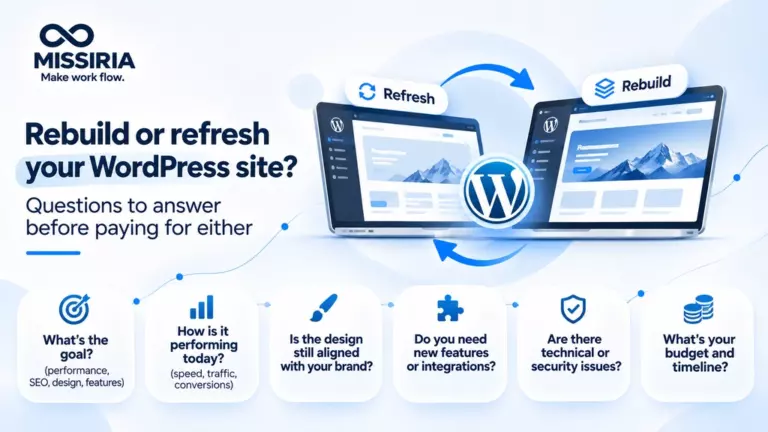
How to tell whether your WordPress site needs a refresh or a rebuild: the job it does, whether its content is original, its foundation, the risks and the ongoing costs.
Next step
Tell us what your site or app needs to do
Send a few lines about the project, who will use it and the tools it must work with. You get a reply by email with questions, a call slot or a written scope.